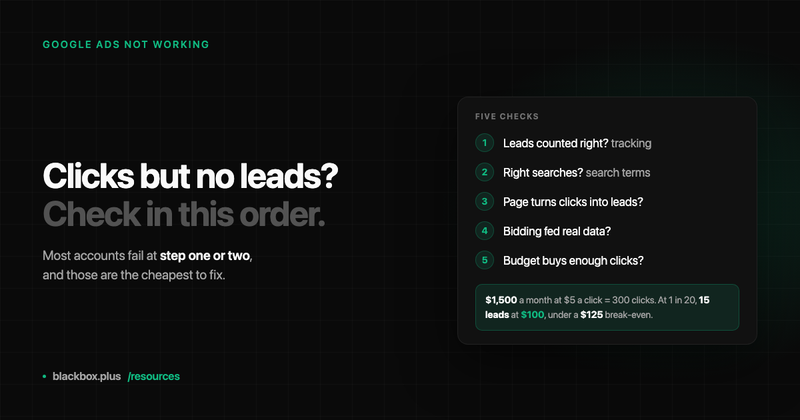
When Google Ads is not working for leads, the cause is almost always one of five things, and it pays to check them in order: whether Google counts your leads correctly, whether the clicks come from people who want your service, whether your page turns those clicks into leads, whether the bidding has real data to work with, and whether the budget buys enough clicks to judge at all. Then compare your cost per lead with the most a lead can cost you, not with last month.
Most accounts that "stopped working" fail at step one or two. Those are also the cheapest to fix, which is why they come first.
The short version:
- Check that Google's conversion count matches the real leads in your inbox and call log before you change anything else.
- Read the search terms report: the searches you pay for matter more than the keywords you chose.
- If clicks arrive but nobody calls or fills the form, the page is the problem, not the ads.
- Smart bidding needs real conversions to learn from, roughly 15–30 a month; with fewer, keep bidding simple.
- Work out how many leads your budget can buy, and judge on a window long enough to contain several of them.
Why are my Google Ads not working?
Google Ads usually stops producing leads because tracking broke, the searches drifted, or the landing page stopped converting, not because "Google changed something". Each of those has a quick test, so you can rule them out in an afternoon.
We'll carry one example through the page. A home service business spends $1,500 a month on Search at about $5 a click. That's 300 clicks a month. A job leaves $500 before ads, and 1 in 4 leads becomes a job, so a lead is worth $125 to them. That's the most they can pay per lead and still break even. (The same idea for online stores is in our break-even ROAS guide.)
If 1 in 20 clicks becomes a lead, 300 clicks bring 15 leads at $100 each. That's working. If the same spend brings 2 leads, each costs $750, and something below is broken.
How do I know if Google is counting my leads correctly?
Count the real leads from last month, form emails plus answered calls from the ad, and compare that number with the Conversions column. If they're far apart, fix tracking before you touch anything else, because every other decision rests on it.
The usual mistakes:
- A page view counted as a conversion, so every visit to the contact page looks like a lead.
- The same form submission counted twice, by a Google tag and an imported Analytics goal.
- Calls not tracked at all, so a business whose customers phone looks like it gets nothing.
- Tracking that quietly stopped after a website update. The conversion action's status in Google Ads says when it last recorded anything.
Too many conversions is as harmful as too few. If Google thinks it's getting cheap leads that never call back, its bidding chases more of the same.
What should I look for in the search terms report?
The search terms report shows what people actually typed before they clicked, and it's often very different from your keyword list. Sort it by cost and read the top 50 terms.
Look for searches from people who will never hire you: job seekers ("plumber jobs"), do-it-yourselfers ("how to fix a leaking tap"), people wanting something free, a service you don't offer, or a town you don't cover. Add those as negative keywords. In the example, if a third of the clicks are DIY searches, that's $500 a month buying nothing.
Two settings cause much of this. Broad match lets Google match loosely related searches, so check it first when the terms look odd. And the location option "presence or interest" shows ads to people who are merely interested in your area; for a local service, choose "presence", people who are in or regularly in your locations.
Why am I getting clicks but no leads?
If the searches look right and tracking is right but clicks still don't turn into leads, the landing page is losing them. Open it on your phone, because most local-service searches happen there, and try to contact yourself.
Check that the page loads in a few seconds, that the phone number can be tapped to call, and that the form asks only what you need to call back, usually name, phone and what the job is. The page should also repeat what the person searched for. Someone who searched "emergency boiler repair" and lands on a general homepage often leaves.
A rough benchmark: a well-matched service page often turns somewhere between 1 in 10 and 1 in 30 clicks into a lead. If you're far below that with good searches, start with the page.
Is my bidding strategy the problem?
Bidding is a problem when the strategy doesn't match the data you have. Maximize clicks buys the cheapest clicks it can find, which is often the least interested traffic. Maximize conversions and target CPA work well, but only when Google sees enough real conversions to learn from, roughly 15–30 a month.
So the order matters. With broken tracking, smart bidding optimizes for the wrong thing. With 3 conversions a month, it has almost nothing to learn from. In that case, Maximize clicks with a cap on the cost per click, or manual bidding, plus tight keywords and negatives, is usually safer until leads build up.
Switching bidding strategies also resets learning. Do it once, for a reason, not every week. (Our roundup of Google Ads automation tools covers what automated bidding can and can't do for you.)
Is my budget too small for Google Ads?
A budget is too small when it can't buy enough clicks to produce a few leads a week. Work it out: daily budget ÷ cost per click = clicks a day, then multiply by the share of clicks that become leads.
$20 a day at $8 a click is 2–3 clicks a day. At 1 in 20, that's one lead roughly every 8 days, so a week with no leads tells you nothing. In the example, $50 a day at $5 buys 10 clicks a day and about one lead every two days, enough to read in a few weeks.
If the numbers come out at one or two leads a month, narrow the campaign so the budget covers fewer, better searches. Pick your best service and your closest area, or raise the budget. Spreading a small budget across ten services makes each of them unreadable.
Why does my cost per lead keep going up?
Cost per lead usually rises because clicks got more expensive or fewer of them turn into leads. Look at which one moved: cost per click and conversion rate are both in the campaign view, side by side, month by month.
Clicks get more expensive when more advertisers bid on the same searches, often in busy seasons, or when Google's recommendations broaden match types and add new keywords. Conversion rates fall when the searches drift, when Search partners or the Display Network were switched on, or when the page or the offer changed. Each of those shows up in the steps above.
When you explain it to the owner, compare cost per lead with the break-even number, not with last month. In the example, going from $80 to $110 a lead feels bad, but it's still under $125 and the campaign is still making money. Going to $150 is the point to act. For working out that ceiling, and why a cheap lead can still lose money, see what is a good cost per lead.
How long should I wait before changing things?
Wait long enough for the change to show up in leads, not clicks: usually two to four weeks for a small account, or until the campaign has had enough clicks to expect several leads. Judge everything on the same window, and change one thing at a time so you know what worked.
Before each change, ask whether it beats leaving the campaign alone. Adding negatives after reading the search terms almost always does. Rebuilding a campaign that's within its break-even cost per lead after a slow week usually doesn't. (Running Meta ads too? The same calm order of checks for a drop there is in Facebook ads not working?. Selling online through Performance Max or Shopping instead? See is Performance Max worth it.)
Blackbox (blackbox.plus) is an AI CMO for small businesses that run their own marketing, and this is the routine it runs on your accounts. It works out the most a lead can cost from your prices, reads the search terms and conversions for you, and only suggests a change when it beats doing nothing. You can connect Google Ads and see what it finds, or build a new Search campaign from a short brief.
FAQ
How much should a lead cost on Google Ads?
A lead should cost less than what a job leaves you before ads, multiplied by the share of leads that become jobs. A job that leaves $500, with 1 in 4 leads becoming a job, means a lead can cost up to $125. Industry averages vary too much to be a useful target for one business.
Should I turn off Search partners and the Display Network?
For a lead-gen Search campaign, start with both off and turn Search partners on later only if leads from it hold up. The Display Network belongs in its own campaign, not as an add-on to Search. Check the segment report first: if partners bring leads at a similar cost, keep them.
Should I use Maximize clicks or Maximize conversions?
Use Maximize conversions once tracking is right and you get roughly 15–30 real conversions a month. Below that, Maximize clicks with a cost-per-click cap, or manual bidding, is usually steadier. Fix tracking before switching to either.
How do I explain a rising cost per lead to the business owner?
Show cost per lead next to the break-even cost per lead, and show which part moved: cost per click or conversion rate. That turns "the ads are worse" into a specific cause and a specific fix. If leads are still under break-even, the campaign is still profitable.
Are Local Services Ads better than Search ads for leads?
Local Services Ads charge per lead instead of per click and show a verified badge, which often suits trades and home services. They give you less control over searches and areas than Search ads. Many local businesses run both and judge each on cost per lead against the same break-even number. Once you have leads, our guide to managing leads from your ads covers following them up.